
Annotate Individual Trees in UAV LiDAR with AI-Assisted 3D Cuboids
 Stan Soldatov
Draw one circle around a crown, fit a cuboid around the entire tree, and use point masks for tree instance segmentation in UAV LiDAR forest scans.
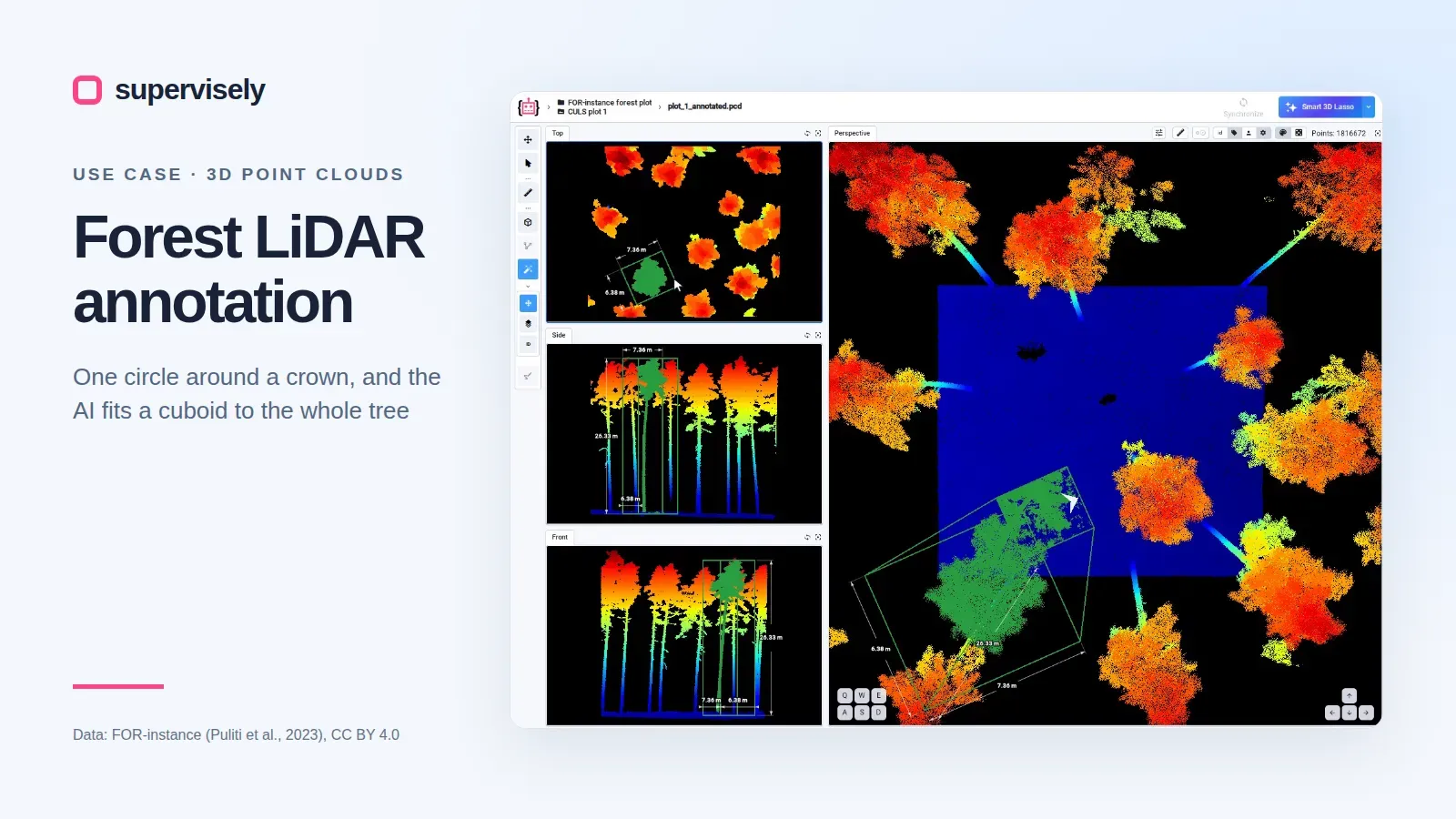
Annotating individual trees in UAV LiDAR is slow when every 3D box must be fitted by hand. In Supervisely's 3D point cloud editor, an annotator circles a crown in the Top view, and the 3D AI Assistant proposes a cuboid from the ground to the treetop. The box is then reviewed and corrected, or replaced with a point mask when a model needs each tree's own points.
Prefer the full walkthrough? Label Trees in Forest LiDAR with AI 3D Cuboids in the Supervisely docs covers the sample project, import, the editor's settings and every step below.
What makes forest point cloud annotation hard?
Laser scans are a standard source for forest inventories: tree counts, positions and heights (Kaartinen et al., 2012). The same scans give the biomass of single trees without cutting them down (Brede et al., 2022). Both rely on models that split a scan into single trees, and those models need hand-labeled trees:
- Crowns touch. A drone scan holds millions of points, and it is hard to see where one tree ends and the next begins.
- Boxing by hand is slow. A hand-drawn cuboid starts as a small box at ground level. Fitting it to a 28 m tree takes a dozen or more edge drags across three views.
- Ground truth is scarce. Tree segmentation methods often overfit small datasets (Puliti et al., 2023).
- Labels are hard to check. A box that looks right from above can still hold empty space beside the crown.
The plot in this post is CULS plot 1 from FOR-instance, a dataset with every tree segmented by hand. It is a UAV scan of a forest stand in the Czech Republic: 1,816,672 points over about 28 × 32 m, under CC BY 4.0.
How do you tell single trees apart in a dense cloud?
The editor handles up to 50 million points per frame (docs), so the plot opens whole in four views: Top, Side and Front projections and a 3D Perspective view. Coloured by height, the crowns show red over blue ground. Orbit below the crowns, as in the clip above, and the stems show where each tree stands. Drag the borders between views to make one projection big: Top shows a crown from above, Side shows one tree from the ground to the top.
How does AI-assisted 3D cuboid annotation work?
The 3D AI Assistant is class-agnostic: it boxes a tree without being trained on trees. It runs as an app on a GPU agent.
Select the class tree, choose Smart Lasso 3D Object Detection and circle one crown in the Top view. About three seconds later, a cuboid spans the whole tree from the ground to the treetop: here 25.84 m high and 7.40 × 5.89 m across.
Press Space and circle the next crown. Each box already holds the tree's position, height and crown size, the numbers an inventory records.
How do you check tree labels in 3D?
With Zoom to object on, the views jump to each new cuboid, so every tree is checked as soon as it is boxed. With it off, the views stay put, which suits boxing many trees in a row.
To fix a box, click it in the Objects list and drag an edge handle in the Top view. Here the third tree's box had about a metre of empty space past the crown. One drag took that side from 7.49 m to 6.44 m, and every point of the tree stayed inside, checked against the dataset's labels.
In a dense stand, select the cuboid and turn on Cuboid vicinity. It hides the points far from the box, so neighbouring trees stop overlapping it in the Top, Side and Front views, and the edge to drag is plain to see.
On a team, labeling jobs add a review: a reviewer checks each plot and sends it back when a box is off.
How much time does the AI save per tree?
Our annotation team boxes a tree by hand in about a minute. With the AI, a box takes 5 to 7 seconds, and a box that needs a fix takes about half a minute more.
| Per tree | By hand (Cuboid tool) | With the AI (Smart Lasso 3D) |
|---|---|---|
| What you do | Place a box and fit it with a dozen or more edge drags in three views | Circle the crown in the Top view, then press Space |
| Time | About 1 minute | 5 to 7 seconds, about 3 of them waiting for the AI |
| Fixing a box | — | About 30 seconds more, usually by dragging an edge |
The manual and fixing times are our annotators' estimates. The AI times come from this post's recordings, where 1 of 4 boxes needed a fix.
For 100 trees, that is about 100 minutes by hand. With the AI it is about 10 minutes of boxing, plus about 12 minutes of fixes if one box in four needs one: about 22 minutes, over four times faster. Even if every box needed a fix, a tree would take under 40 seconds instead of a minute. Trees whose crowns touch need more fixes, so expect less saving in a dense stand.
Which label makes ground truth for tree instance segmentation?
| Label | What it holds | What it is for |
|---|---|---|
| Cuboid | The tree's position, height, crown dimensions and cuboid orientation | Tree counts, positions and heights for inventory; inputs to biomass models |
| Point mask | The tree's own points, without the ground | Training and testing tree instance segmentation and species models |
A cuboid also holds the ground under the crown, so segmentation models need a point mask. The Point Cloud Pen draws one in two steps, each in an enlarged projection:
- Outline the crown in the Top view, a little outside its edge. The mask takes every point under it, the ground included.
- Cut the ground away in the Side view. Hold
Shiftand outline the ground band. Step the outline down around the stem: here the stem starts at about 1.0 m and the ground reaches 1.2 m, so a straight cut would keep ground or cut off the foot of the stem.
The mask holds all 85,626 points of the tree, and only 677 of the 51,773 ground points under the crown, at the foot of the stem.
What does AI-assisted labeling change for forest LiDAR?
Forest inventories, biomass estimates and tree segmentation models all need trees labeled one by one in 3D. With the 3D AI Assistant, each tree is one circle in the Top view: a box from the ground to the treetop in 5 to 7 seconds, against about a minute by hand. The annotator's job shifts from fitting boxes to checking them and fixing the few that are off, usually with one edge drag. When a model needs each tree's own points, the Point Cloud Pen makes a point mask in two outlines. The saving is largest in open stands like this plot; where crowns touch, expect more fixes.
Sources
- Kaartinen, H., Hyyppä, J., Yu, X., Vastaranta, M., Hyyppä, H., Kukko, A., et al. (2012). An International Comparison of Individual Tree Detection and Extraction Using Airborne Laser Scanning. Remote Sensing, 4(4), 950–974. doi:10.3390/rs4040950
- Brede, B., Terryn, L., Barbier, N., Bartholomeus, H. M., et al. (2022). Non-destructive estimation of individual tree biomass: Allometric models, terrestrial and UAV laser scanning. Remote Sensing of Environment, 280, 113180. doi:10.1016/j.rse.2022.113180
- Puliti, S., Pearse, G., Surový, P., Wallace, L., Hollaus, M., Wielgosz, M., and Astrup, R. (2023). FOR-instance: a UAV laser scanning benchmark dataset for semantic and instance segmentation of individual trees. arXiv:2309.01279. Data: doi:10.5281/zenodo.8287792, CC BY 4.0.
Try it on a forest plot
Add the Forest LiDAR Tree Annotation sample project from the Ecosystem in one click, and follow the complete walkthrough on it. Your own scans go in by drag and drop (.pcd, .ply, .las and .laz), through import apps, or by linking a cloud bucket instead of copying it. The labels export in Supervisely format or train a 3D detector in the same platform. If you need a tree-level UAV LiDAR dataset prepared for you, contact us: our annotation team can label your scans in Supervisely.
Frequently asked questions
What is forest point cloud annotation?
Labeling individual trees in a laser scan of a forest, as a 3D cuboid or a point mask per tree. The labels train and test models for forest inventory, tree height, biomass and species.
Does the 3D AI Assistant need to be trained on trees?
No. It is class-agnostic. Circle a crown in the Top view with Smart Lasso 3D Object Detection, and it places a cuboid around the whole tree, from the ground to the treetop, in about three seconds.
Which point cloud formats can I import for forest LiDAR?
Quick Auto Import takes .pcd, .ply, .las and .laz files by drag and drop. Import apps in the Ecosystem cover more, and data in a cloud bucket (AWS S3, Google Cloud Storage, Azure) can be linked instead of copied into Supervisely.
Can I try it without my own data?
Yes. The Forest LiDAR Tree Annotation sample project in the Ecosystem holds one FOR-instance forest plot with the classes tree and tree_points. Click GET PROJECT on its card to add it to your workspace.