
Beyond Annotation: How We Build an Instance Segmentation Dataset
How the Supervisely annotation service builds a production instance segmentation dataset: calibration on 20 images, edge cases, automation, QA, delivery.

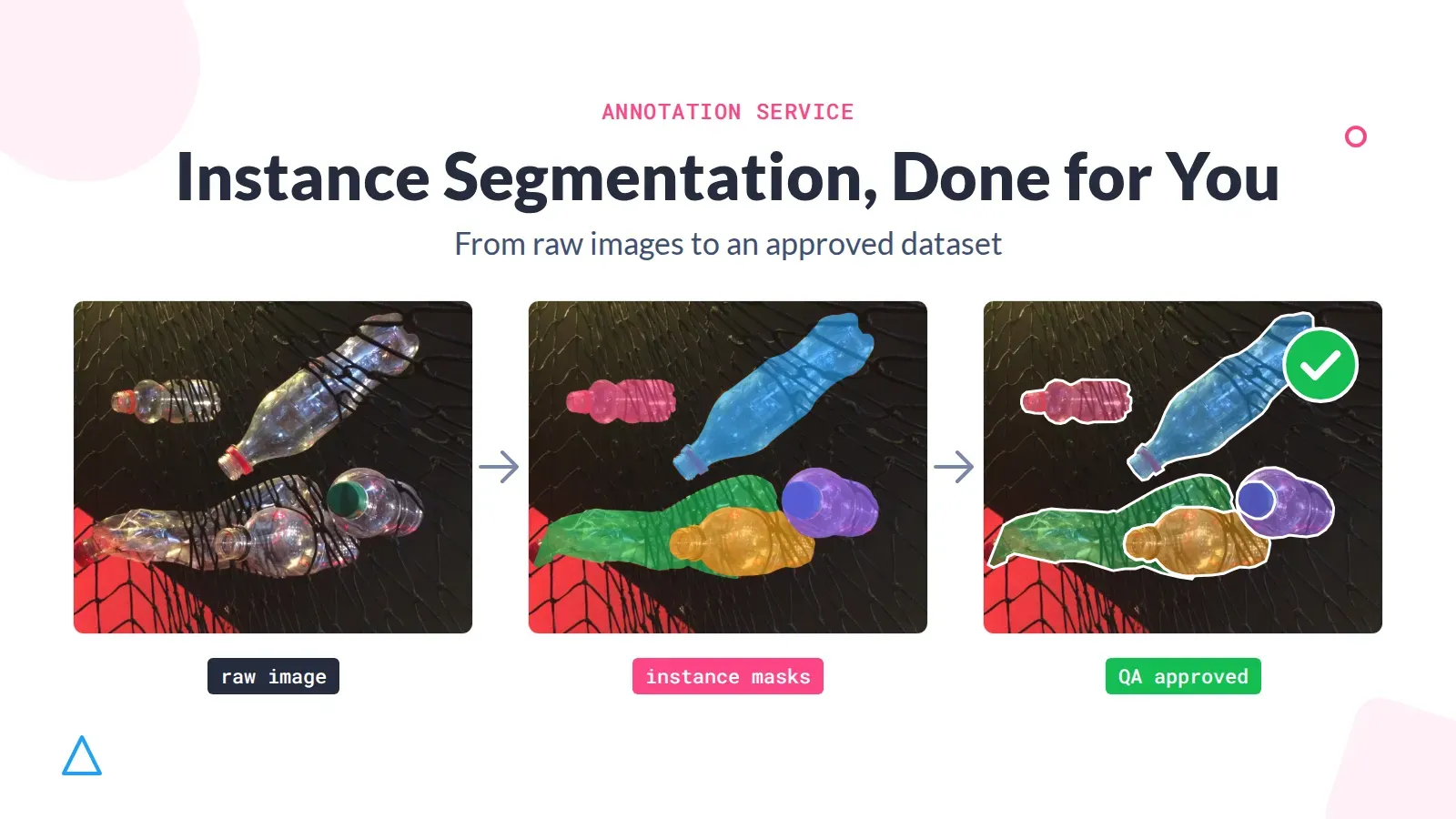
Imagine an ML team developing a model to detect and segment litter in real-world scenes. Training it requires annotations for thousands or tens of thousands of images, not a few hundred. At this scale, the team needs more than a one-time collection of masks: it needs a stable production process with consistent rules, predictable throughput, quality control and a clear budget.
The main risk in a large project is not drawing the polygons. If the initial guidelines do not say how to handle small, occluded, truncated or ambiguous objects, different interpretations quickly turn into thousands of inconsistent annotations and expensive rework. The team may also have to recruit and train annotators, distribute tasks, answer recurring questions and inspect the results.
Supervisely Annotation Service takes over this workflow from end to end. We test the task definition on a calibration batch, find missing rules and edge cases, help turn the guidelines into production-ready instructions, and estimate timeline and cost. Then we assign a team that works only with that project's data and rules. A stable team keeps the project context, does not switch between unrelated requirements, and becomes faster and more consistent over time.
Supervisely is more than an annotation workforce. Annotators, reviewers, project managers, computer vision engineers and platform developers work as one team. When calibration reveals a repetitive bottleneck, we configure existing AI-assisted labeling tools or build a project-specific app, model integration, validator or workflow, instead of asking people to repeat the same manual action thousands of times.
Supervisely Annotation Service runs the whole process on your data: calibration, a dedicated team, automation and QA.
Send a representative sample and a short task description.
Below, we walk through that workflow on a demonstration litter segmentation project. It covers the complete cycle: calibration on 20 images, alignment on difficult cases, project-specific automation, production annotation, QA and final delivery. The goal is to show what happens between uploading raw data and receiving an approved dataset.
Prefer the reference page? Instance segmentation annotation service in the Supervisely docs has the same project with every stage, metric and time estimate.
From problem to solution: why clients choose the service
The client keeps control over business and domain decisions without having to build and manage annotation production day to day.
| Client problem | What Supervisely Annotation Service takes on | Practical result |
|---|---|---|
| The guidelines are incomplete or exist only as a high-level task description | A specialist tests the requirements on a calibration batch of 20 images, collects questions and helps turn the client's decisions into operational rules | Ambiguities are resolved before large-scale annotation, not after thousands of errors appear |
| The timeline and budget are unknown | We measure the calibration batch and account for object count, mask complexity, classes and QA coverage | The proposal is based on the client's data, not on an abstract per-image price |
| There is no trained team, or no capacity to recruit, onboard and coordinate one | After approval, we assign annotators, a reviewer and a project manager trained on the project's guidelines | The client works with one accountable team instead of managing individual contributors |
| Different people may read the rules differently at scale | A stable team works only with the project's data and guidelines, and new cases are documented and resolved in one place | Less variability and rework, higher first-pass acceptance |
| Throughput must grow without losing quality | The project manager plans capacity, and QA, corrections and re-review are built into production | The project scales in a controlled way instead of leaving quality checks to the end |
| Standard labeling tools do not fit the project | Engineers analyze repetitive work and configure or build project-specific pre-annotation, validation and routing tools | Less manual work, fewer preventable errors, and a workflow that can be reused on the next batch |
| The client needs a usable dataset, not access to a tool | We configure the project, monitor progress, validate the data structure, prepare the export and provide a QA report | An approved dataset, final guidelines and transparent quality metrics |
Project at a glance
| Project parameter | Result |
|---|---|
| Task | Instance segmentation of litter objects in real-world scenes |
| Project scale | 5,000 images |
| Annotation classes | 60 classes |
| Objects annotated | About 300,000 instances |
| Objects per image | 30–100 |
| Team | 5 annotators, 2 QA reviewers, 1 project manager |
| Engineering support | CV/ML engineers and platform developers |
| Calibration | 20 images |
| Custom automation | AI mask proposals, dense-scene workflow, automated validators |
What was delivered: approved instance masks, the agreed class taxonomy, final annotation guidelines, a QA report, and the dataset in Supervisely and COCO Instance Segmentation formats.
The annotation request
The client needs pixel-level masks for visible litter objects in outdoor and indoor scenes. The data has small objects, irregular shapes, partial occlusions, similar-looking materials, and objects whose boundaries blend into the background.
The request looks simple: pick the correct class and draw a mask around every relevant object. In practice, a production-ready specification also has to answer questions like these:
- Which objects count as litter, and which belong to the background?
- How should partially hidden or damaged objects be annotated?
- Should disconnected parts of the same object form one instance or several?
- How precisely should annotators follow an unclear or blurred boundary?
- What happens when the material is visible but the exact class is uncertain?
- Which objects are too small or ambiguous to annotate reliably?
These decisions affect quality, annotation speed and price. Settling them before the estimate and before production is one of the main jobs of the annotation service.
How the managed annotation process works
The project follows six stages. First, one specialist tests the initial requirements on a small calibration batch and collects open questions. The same batch shows which repetitive actions are worth automating. After the edge cases are aligned with the client, the team finalizes the guidelines, designs the automation and makes an estimate of timeline and cost based on what calibration measured. Once the proposal is approved, a project manager coordinates production, engineers support the workflow, and reviewers check the output against the final guidelines.
| Stage | What the service and client do | What the client can review | Output |
|---|---|---|---|
| 1. Initial assessment | Reviews the data, objective, taxonomy, existing guidelines, output format and acceptance criteria | Preliminary scope and open questions | Draft brief and calibration plan |
| 2. Calibration batch | One specialist selects, reviews and annotates 20 images covering the main data types and edge cases | Annotated examples, ambiguities and questions | Calibration annotations and question list |
| 3. Alignment, guidelines, automation design and estimate | Reviews ambiguous cases with the client, records decisions, selects automation and calculates effort, timeline, QA and cost | Edge cases, final guidelines, automation plan, assumptions and calculation | Estimate and production plan |
| 4. Production | Annotates the remaining images with the agreed rules, AI-assisted tools and project-specific workflow improvements | Progress, automation performance and interim samples | First-pass annotations |
| 5. QA and correction | Runs automated validators, reviews annotations, records issues, returns errors and approves the final result | QA report, corrected examples, acceptance metrics | Approved annotations |
| 6. Delivery | Validates the project structure, exports the data and documents reusable automation | Final delivery summary | Dataset, guidelines, QA report and automation package |
1. Turning the request into an annotation specification
Before the first mask is drawn, the project manager and the annotation lead review the source data and turn the request into operational instructions. This step defines what "correct" means for this project.
For the litter project, the draft specification covered:
- the taxonomy and annotation rules;
- mask and QA requirements;
- the delivery format and automation opportunities.
The first version is a draft on purpose. Real ambiguities usually show up only when a specialist applies the rules to the calibration images. The guidelines are finalized after those cases are discussed with the client.
2. Selecting a representative project sample
A useful calibration batch is as hard as the production data. From the 5,000 images, we selected 20 that cover the main data types and the expected edge cases. A batch of only clean, easy images would give misleading speed and cost estimates.
The calibration batch included:
- images with different numbers and sizes of objects;
- clear and ambiguous classes and boundaries;
- visible, occluded and truncated objects on varied backgrounds.
Each image got an internal complexity label: easy, medium or hard. The labels explain differences in annotation time and cost, and let the engineering team benchmark automation on simple and difficult scenes separately.
Project-specific automation for litter annotation
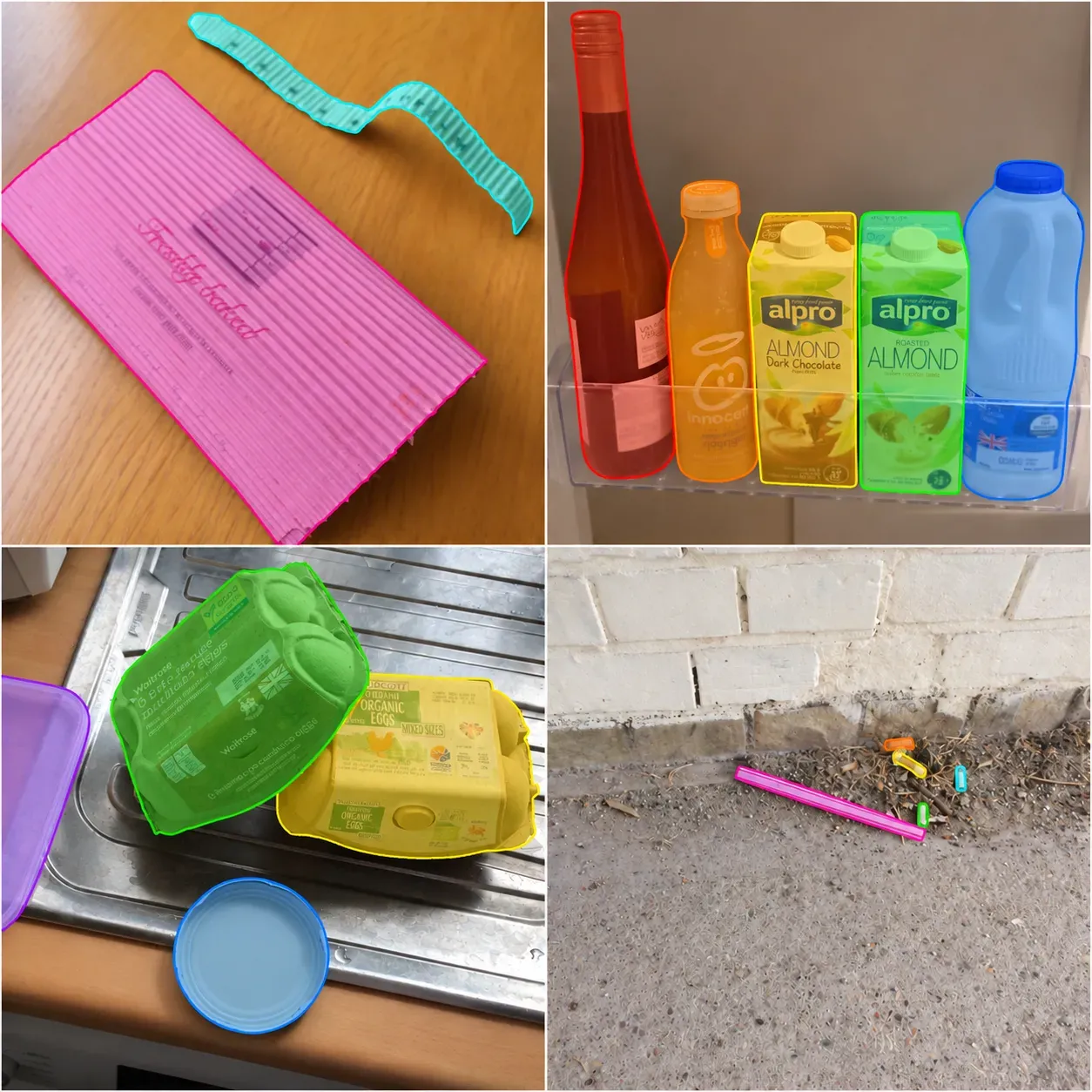
Calibration showed three bottlenecks: repeated mask creation, dense scenes with dozens of tiny objects, and preventable geometry errors. Instead of treating them only as staffing problems, the Supervisely engineering team designed an automation layer for this project:
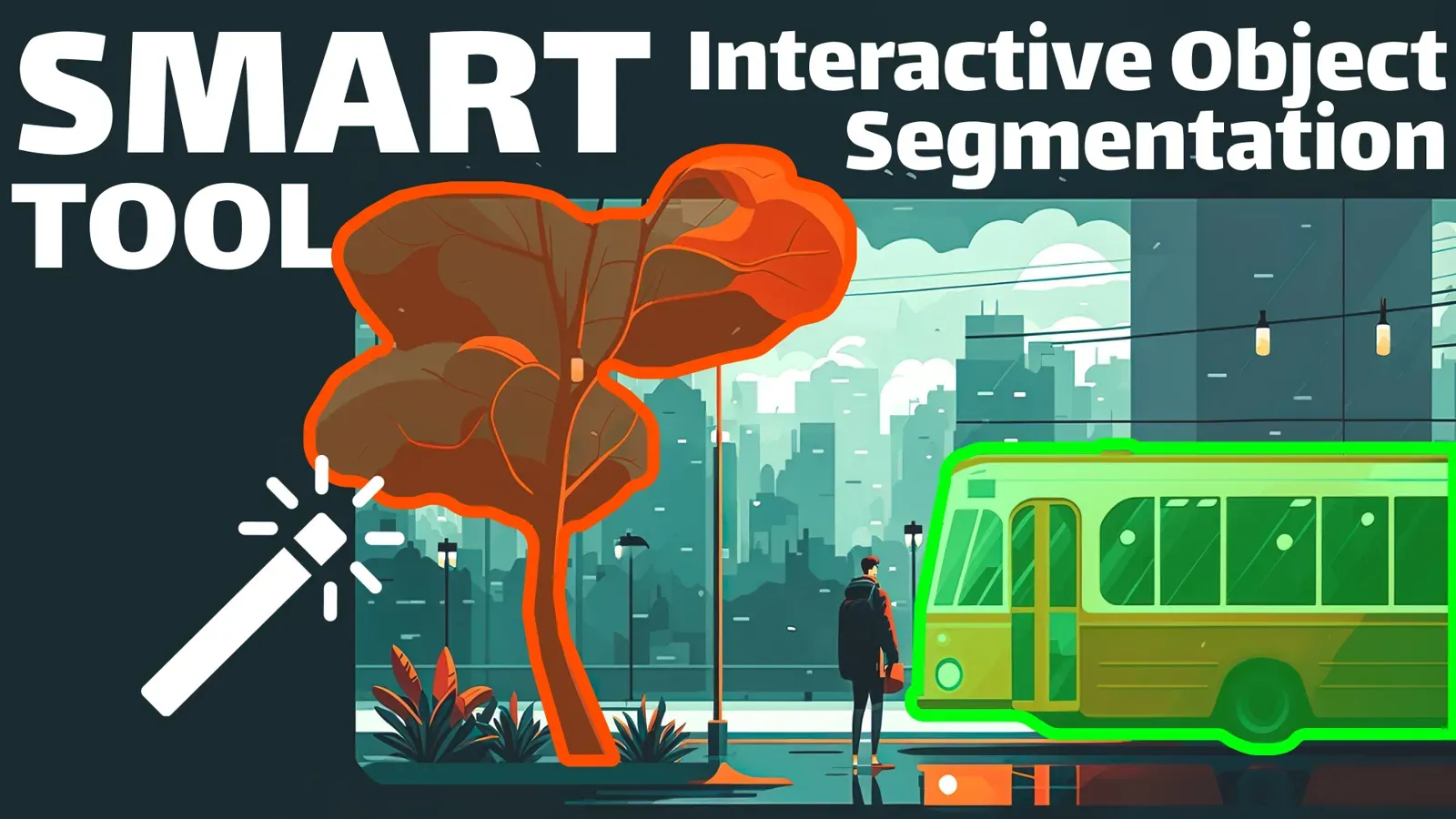
- AI-assisted mask proposals. Smart Tool and a project-specific segmentation model create a first mask from a click or a rough box. The annotator remains responsible for the class, the boundary and the final acceptance.
- Dense-scene workflow. Images with many small objects are split into overlapping regions of interest and checked in a focused review sequence. Annotators search a smaller area at a time, so tiny fragments are missed less often.
- Automated validation and routing. Before submission, project rules flag duplicate or overlapping instances, invalid masks, unusual object counts and classes that need a closer look. Dense images and rare classes go automatically to experienced annotators or to expanded QA.
Automation is introduced only after it is tested on the calibration batch. If correcting a model's mask takes longer than drawing one by hand, the team changes the tool or keeps that case manual. The goal is not to remove human judgment, but to spend it where it matters most.
Edge-case examples from TACO
The four images below were picked from the TACO dataset by measurable signs of annotation difficulty. They show the questions a specialist should find during calibration and settle with the client before the estimate.
Edge case 1: many very small objects
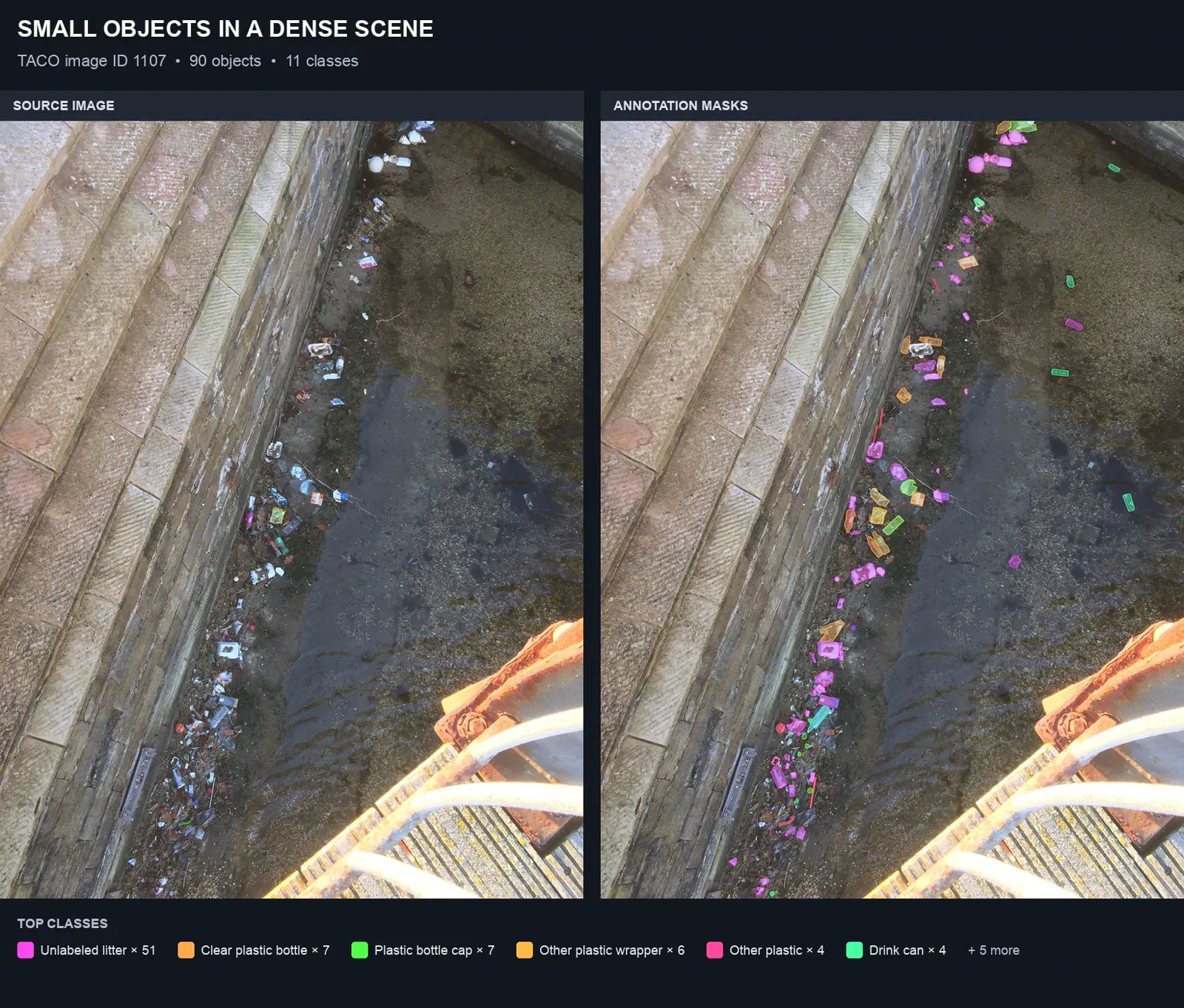
This image has 90 annotated objects across 11 classes. Every object takes up less than 0.1% of the frame, and 59 take up less than 0.02%. Calibration has to set a minimum object size, a completeness requirement, and a policy for objects whose class can't be told by eye. The dense-scene workflow splits the frame into manageable regions and tracks which ones have been checked.
Question for the client: should every visible fragment be annotated regardless of size, or should objects below an agreed threshold be skipped?
Edge case 2: separating many similar fragments
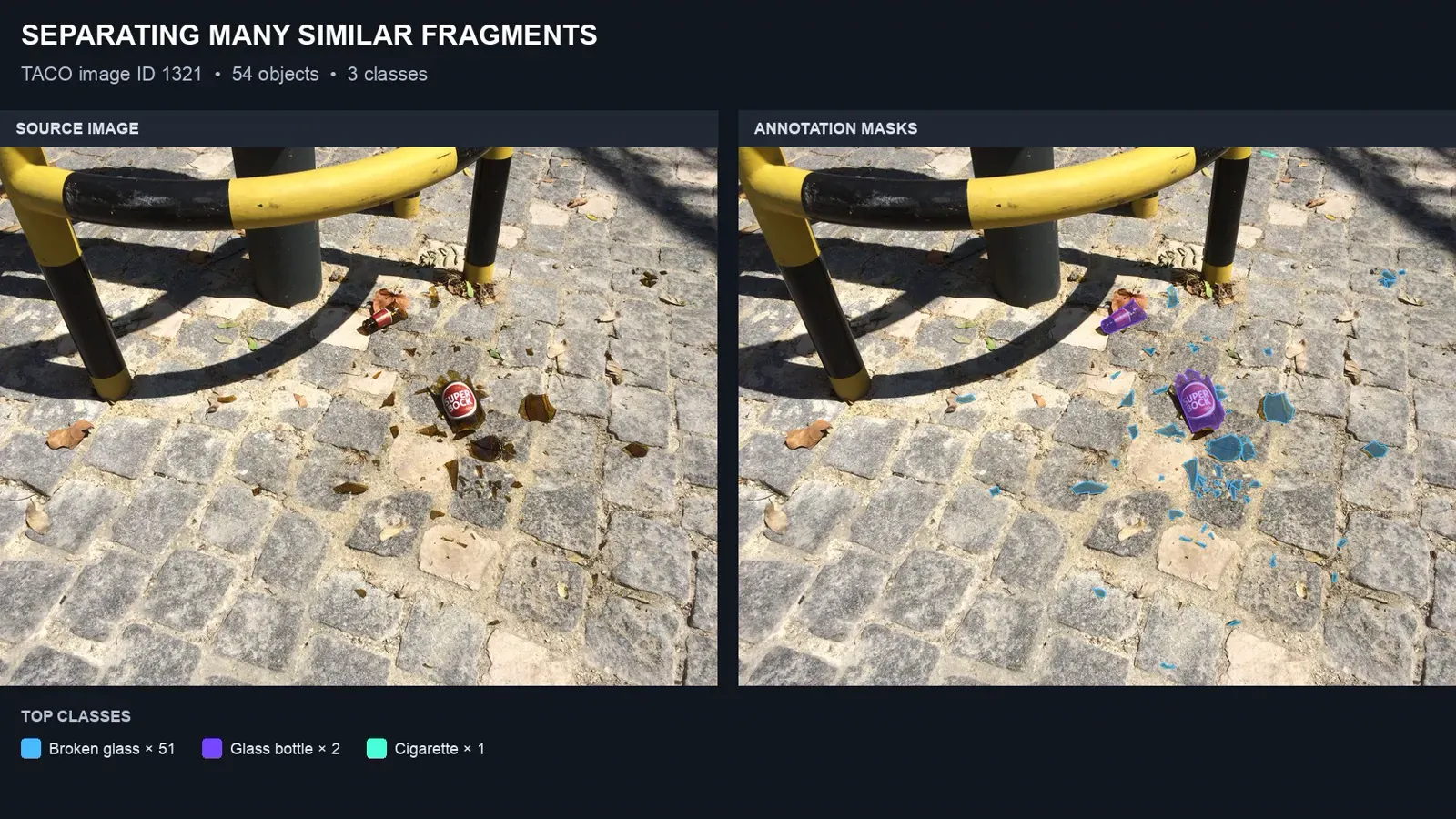
The image has 54 objects, including 51 broken-glass fragments; 50 objects take up less than 0.1% of the image. The hard part is not one mask boundary but the definition of an instance: is every shard its own object, and what about fragments that almost touch? A validator can flag overlapping or duplicate masks, but the separation rule stays a decision for the client and the people annotating.
Question for the client: should every physically separate shard be its own instance, or may nearby fragments be grouped by an agreed rule?
Edge case 3: a complex contour and internal holes
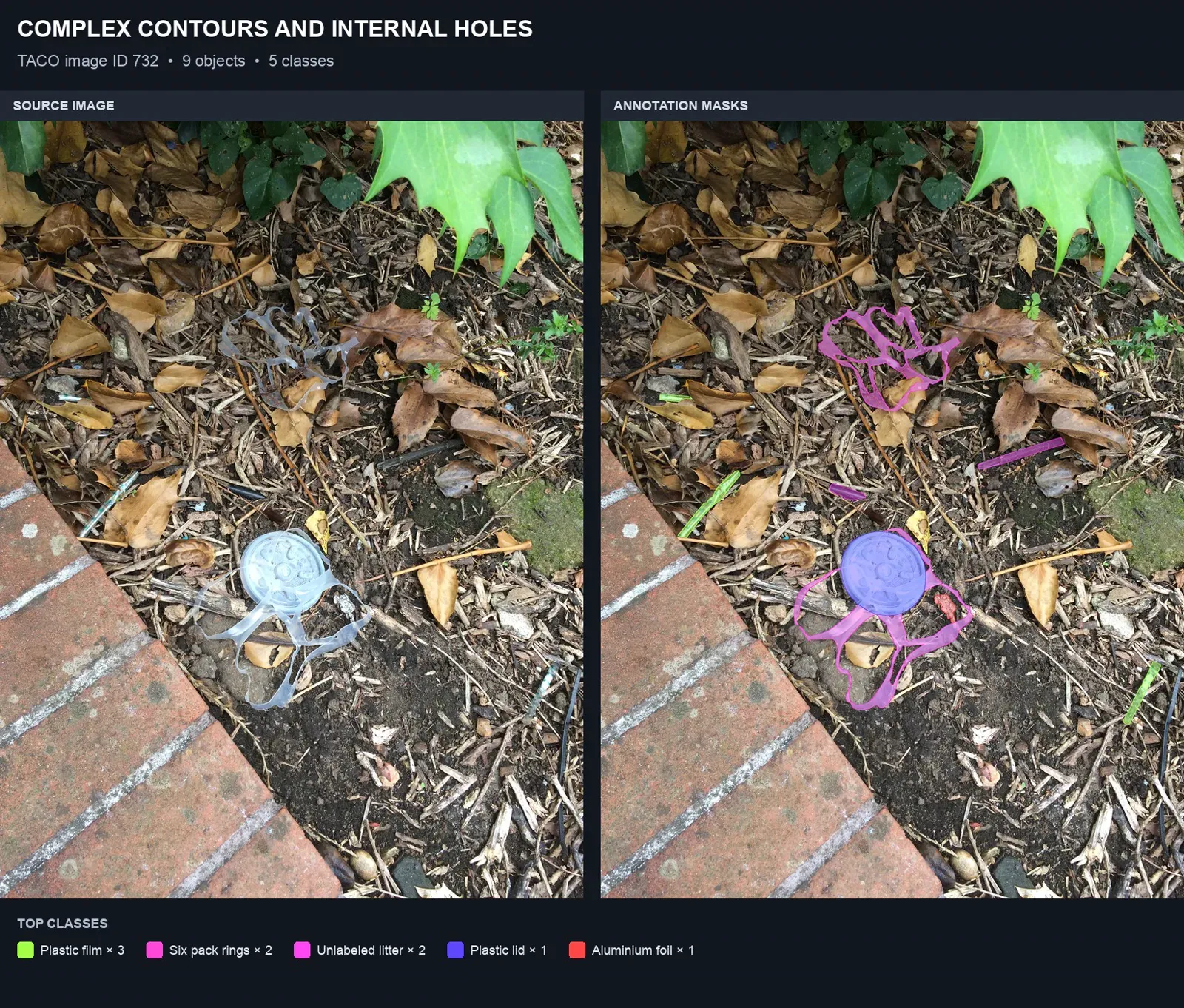
One object here is a polygon with 543 vertices. The six-pack ring has narrow connectors, internal holes and parts hidden by leaves. This example sets the required mask precision and whether internal holes must be kept. AI-assisted segmentation can draw the first contour, and the annotator checks the holes and thin connectors before accepting it.
Question for the client: must masks follow every hole and thin connector precisely, or is simplified geometry acceptable within a set tolerance?
Edge case 4: thin, low-contrast objects
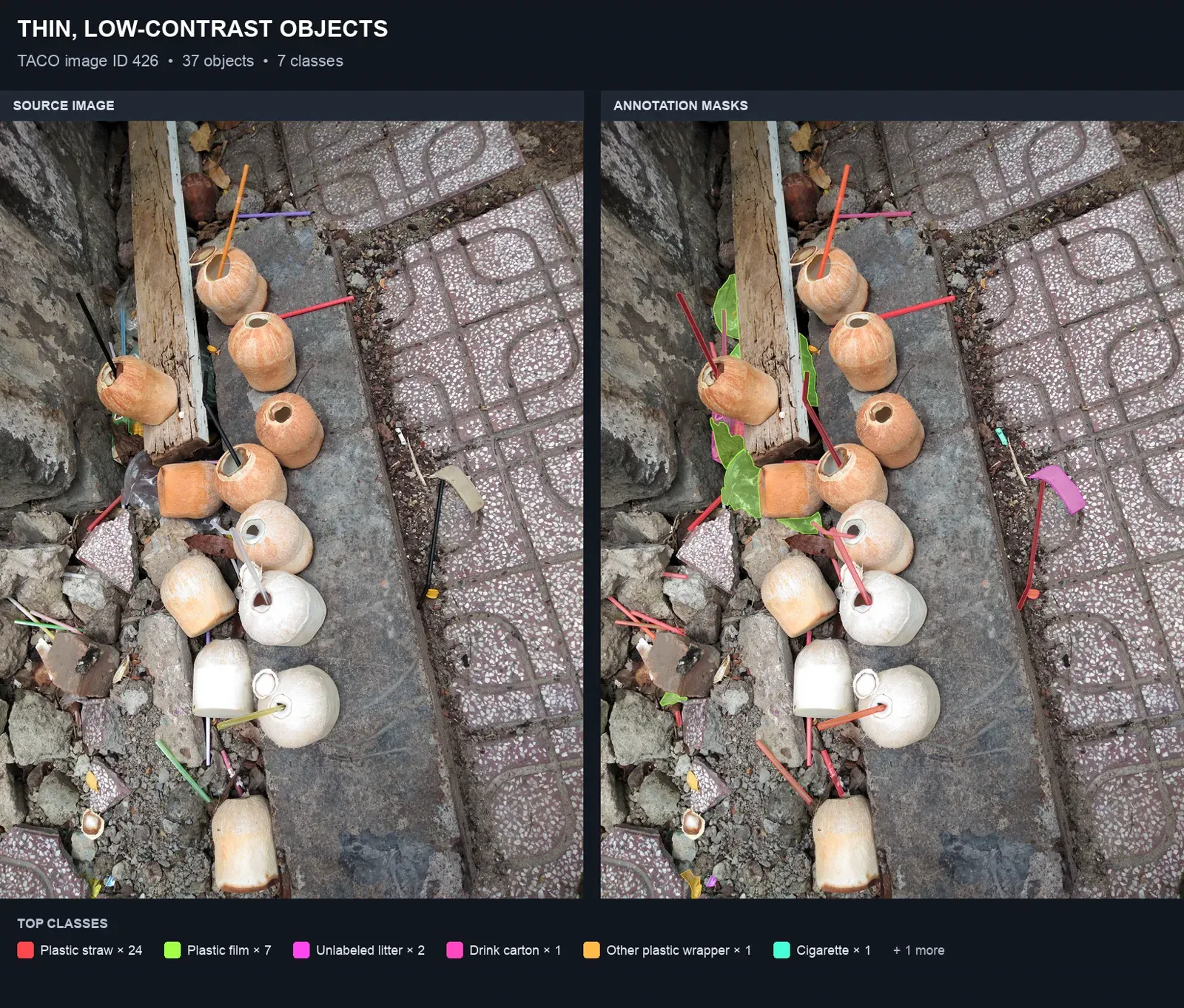
The scene has 37 objects across seven classes, including 24 plastic straws; 28 objects take up less than 0.1% of the image. Thin objects partly blend into the textured background, and some are visible only as fragments. When the model's proposal is unstable, the workflow falls back to manual annotation instead of forcing an inaccurate mask.
Question for the client: what minimum thickness and visibility are enough to annotate an object, and what happens to a fragment that can't be confidently linked to a whole object?
Together, these images make a useful calibration batch: each shows a different kind of uncertainty, and together they reveal which rules are missing from the initial guidelines before production starts.
3. Running calibration and aligning edge cases with the client
During calibration, one annotation specialist tested the initial requirements on the 20 selected images.
The point is not to compare several annotators. It is to find everything the guidelines still leave undefined that could change the project scope. The specialist records questions about which objects to include, classes, mask boundaries and other ambiguities. At the same time, an engineer looks for repetitive actions and tests whether AI assistance or a custom validator saves time without lowering quality.
After the discussion, the client completes the guidelines where the original rules did not cover a case. We check that every agreed decision is written down and can be applied consistently. Only then do we estimate annotation complexity and speed, select the automation that passed calibration, define the QA approach, and confirm the timeline and cost.
4. Annotating the production batch
After calibration, final guidelines and an approved proposal, the team annotates the remaining images. Eligible objects get AI-assisted mask proposals; annotators verify every suggestion and handle ambiguous cases by hand. Automated validators run before submission, and dense or unusual images go to the right specialist.
The project manager follows progress and quality, and engineers watch how the automation performs on real batches. If corrections show a repeated failure, the team updates the model settings, the validator or the workflow for the next batch. The process improves during the project instead of staying fixed from day one.
5. Reviewing quality and correcting errors
Quality control has three layers: automated validation, annotation review and final QA.
Project-specific validators run before human review. They don't decide whether an annotation is semantically correct, but they catch preventable issues: duplicate instances, invalid masks, suspicious overlaps and project-rule violations. Reviewers can then spend their time on classes, completeness and boundaries.
First, reviewers check every completed annotation against the agreed guidelines. They look for missing or extra objects, wrong classes, inaccurate boundaries and instance-separation errors. Tasks with issues go back to annotators with comments and are reviewed again after correction. In this project, 6% of tasks were returned at this stage.
Then a senior reviewer runs independent QA on approved tasks. The share of tasks checked is agreed with the client; here it was 25% of each batch. The QA follows these principles:
- the sample includes work from every annotator, all classes and every complexity level;
- difficult images and rare classes are checked more often;
- a critical error sends the related batch back;
- if an error repeats, the sample grows and already approved tasks are checked again;
- the result is approved only after all critical and systematic issues are fixed.
After final QA, the repeat-return rate was 2%.
How annotation quality was measured
Annotation quality is measured with several metrics: object completeness, class and mask accuracy, and review outcomes.
| Quality metric | What it answers | Final result |
|---|---|---|
| Object completeness / recall | Were required objects missed? | 99.5% |
| Class agreement | Were objects assigned to the expected classes? | 99.7% |
| Mask overlap / IoU | How closely do approved masks match the adjudicated reference? | 0.95 |
| First-pass acceptance rate | How much work passed review without correction? | 94% |
| Correction rate | How much work needed at least one change? | 6% |
| Critical-error count | Did any issue make the data unusable? | 0 after final QA |
| Review coverage | What share of the project was inspected? | 100% review; 25% final QA |
The reference annotations already in TACO help with comparison, but they are not ground truth by default. Where an approved mask and the source annotation differ, the annotation lead reviews the case and records whether it is a service error, an acceptable alternative boundary, or a difference in project rules.
How long the project took
The project took 15 working days. Total effort, including setup, annotation, review and corrections, was 500 person-hours.
| Work stage | Time | How it was measured |
|---|---|---|
| Scope and solution design | 4 hours | Project manager, annotation lead and engineering assessment |
| Guidelines and automation plan | 4 hours | Written rules, visual examples, validator logic and AI-assistance setup |
| Calibration | 2 hours | Batch annotation, automation benchmark, question collection, client discussion and final review |
| Estimate and commercial proposal | 4 hours | Effort, timeline, QA and cost calculated from calibration |
| Production annotation | 420 hours | Active annotation time of five annotators |
| QA and corrections | 64 hours | Review, rework and final acceptance |
| Export and delivery | 2 hours | Validation and packaging |
| Total effort | 500 hours | Total active time across the team |
| Total turnaround time | 15 working days | From approved scope to final delivery |
Five annotators worked in parallel, and review and QA ran as each batch was completed. That is why the calendar time is much shorter than the team's combined effort.
From calibration on 20 images to a 5,000-image project
The project started with a calibration batch of 20 images. A specialist used it to check the 60-class taxonomy and clarify the rules for difficult cases, and engineers used the same batch to benchmark AI-assisted masks and define automated checks. Calibration took two hours and produced consistent instructions and an automation plan for the whole team.
Once the rules and automation were agreed, five annotators started production, two reviewers checked completed batches, a project manager coordinated the work, and engineers supported the project-specific tools. The team processed 5,000 images with 30–100 objects each and annotated about 300,000 objects.
Every annotation was reviewed, and 25% of the tasks in each batch went through final QA. The project took 15 working days: 420 hours of production annotation and 500 person-hours including setup, review and corrections.
What the client receives
At the end of the project, the client receives a ready-to-use dataset and everything that goes with it:
- 5,000 images with approved instance segmentation annotations;
- about 300,000 annotated objects across 60 classes;
- the final taxonomy and annotation guidelines;
- the configured AI-assisted workflow and automated validation rules;
- a QA report covering review, corrections and final checks;
- final quality and productivity metrics;
- the dataset in Supervisely and COCO Instance Segmentation formats.
What this project shows
This project shows how a managed annotation service takes an instance segmentation task from a small calibration batch to a ready-to-use dataset:
- Calibration reduces uncertainty. A 20-image batch refined the rules for 60 classes before production began.
- The team handles production scale. Five annotators, two reviewers and a project manager processed 5,000 images and about 300,000 objects in 15 working days.
- Quality is controlled at several levels. Every annotation was reviewed, 25% of tasks went through final QA, object recall reached 99.5%, class agreement 99.7% and IoU 0.95.
- Engineering makes the workflow faster. AI-assisted masks cut repetitive contour work, the dense-scene workflow helps prevent missed objects, and validators catch mechanical errors before human review.
The client gets more than access to platform tools: agreed rules, coordinated production, project-specific automation, quality control at several levels, and a dataset ready to use.
Not just outsourced annotation
A strong annotation service does not simply add more hands to a difficult workflow. It understands the data, decides where human judgment is essential, and engineers away the repetitive work that does not need it. That is the advantage of working with the whole Supervisely team rather than a standalone annotation workforce.
The client leaves with more than one finished batch. They get a reusable production system: guidelines, trained specialists, QA rules, automation components and a dataset structure that carry over to the next delivery. As new batches arrive, the workflow improves with corrected annotations, new validators and better project-specific models, so the process gets faster and more consistent over time.
Project results
| Metric | Result |
|---|---|
| Calibration time | 2 hours |
| Average annotation time | About 5 minutes per image |
| Production annotation effort | 420 hours |
| Total project effort | 500 person-hours |
| Project-specific automation | AI mask proposals, dense-scene workflow, validators |
| Annotation budget | €2,100 |
Request an estimate for your own data
If you are planning a data annotation project, send us a representative sample and a short description of the task through the contact form. Our annotation and engineering teams will review the data, decide what should stay human-led and what can be safely automated, and propose a workflow, QA plan, timeline and cost.
FAQ
What does the Supervisely annotation service do on an instance segmentation project?
It runs the whole workflow. A specialist tests the task on a calibration batch, the team settles edge cases with the client, engineers set up project-specific automation, a dedicated team annotates, reviewers run QA, and the client receives an approved dataset with guidelines and a QA report.
Why start with a calibration batch?
Missing rules show up only when someone applies them to real images. In the demonstration project, one specialist annotated 20 images that cover the main data types and edge cases, collected the open questions and settled them with the client before the estimate and before production.
How is the timeline and cost estimated?
From the calibration batch, not from an abstract per-image price. The estimate accounts for object count, mask complexity, classes, QA coverage and the automation that passed calibration.
How is annotation quality measured?
With several metrics at once. Object recall shows missed objects, class agreement shows wrong classes, mask IoU shows boundary accuracy, and the first-pass acceptance and correction rates show how much work reviewers sent back. In the demonstration project, every annotation was reviewed and 25% of each batch went through final QA.
Does AI replace the annotators?
No. Smart Tool and a project-specific model propose a mask from a click or a rough box, and the annotator remains responsible for the class, the boundary and the final acceptance. When correcting a proposal takes longer than drawing the mask, that case stays manual.
What does the client receive at the end?
Approved instance masks, the final taxonomy and annotation guidelines, the configured AI-assisted workflow and validation rules, a QA report with quality and productivity metrics, and the dataset in Supervisely and COCO Instance Segmentation formats.